Pricing
Simple pricing.
No hidden AI markup.
Vialine is $9.97/month or $97.79/year. That keeps your business AI workspace running. It pays for the guided workspace layer, not a hidden spread on model calls. When you bring your own AI provider key, your model usage stays between you and the provider.
Core pricing
Vialine Workspace
$9.97
per month
or $97.79/year
A simple product fee for your business AI workspace, guided setup, provider controls, and BYOK support.
- Business-specific AI assistants
- Guided onboarding and workspace setup
- Bring-your-own-key provider support
- Model selection and routing control
- Agent instruction management
- No hidden markup on BYOK API usage
- Built for practical daily business help
Provider API usage is billed separately by your chosen provider when you use your own key. Vialine does not add a margin to those API charges.
Workspace fee
What your subscription
pays for
Your $9.97/month keeps Vialine running: hosting, workspace tools, assistant setup, onboarding, product development, security work, and support.
It is not a hidden spread on your AI usage.
When you connect your own provider key, you control the model relationship directly. You can choose Groq, OpenAI, Anthropic, or another supported provider based on your own cost, privacy, and quality preferences.
That is part of the trust model. Vialine is the workspace layer. Your provider relationship stays yours.
You pay Vialine for the workspace.
You pay the AI provider for model usage.
We do not add a margin to your API cost.
Integrations & Workflows
Native integrations.
Enhancing every week.
Vialine connects your AI assistants directly to the tools you already use. Keep your business running smoothly without making Vialine the system of record.
📅Included
Google Workspace
Fully integrated with Google Calendar & Google Drive. Ground your agents directly in your Drive files and let them manage your schedules in secondary calendars safely.
🧡Included
HubSpot CRM
Native connection to read contacts, deals, and notes. Let your assistants look up records and draft follow-up actions with complete context.
🟢Included
QuickBooks Online
Read-only connection for invoice summary, customer history, and accounts receivable context to help automate financial check-ins.
Featured Cross-System Workflow"Schedule a Google Calendar meeting with a HubSpot contact"
Vialine agents can intelligently orchestrate across multiple tools. You can instruct your agent to look up a HubSpot contact's details, check your availability on Google Calendar, and set a calendar meeting in a single natural chat command.
📚Grounding
Knowledge "Grounding Books"
Upload reference manuals, pricing guides, or onboarding docs to your custom AI Grounding Books. Your assistants read from these books just-in-time during chats to provide exact answers.
🔄Roadmap
Growing Integration Catalog
We are actively building new connections. Microsoft Office 365, Amazon S3 Buckets, and GoHighLevel CRM are currently in early testing and shipping soon.
🛠️Custom
Unsupported System?
If your business runs on a custom database, an unsupported API, or a proprietary platform, we can build custom connectors as a separate scoped service. Contact us to learn more.
Included in Workspace Fee: Guided onboarding, provider setups, Google/HubSpot/QuickBooks connectors, and standard Grounding Books.
Unsupported / Custom Work: Proprietary database connectors, custom outbound workflows, and advanced third-party CRM API builds.
Get a Scoped Quote: Email
hello@vialine.io and we will explain plainly what is native, what is custom, and what it costs.
Why this is different
Vialine is built for more control.
A lot of AI helper tools hide the economics. You pay a monthly fee, but you may not know what model is being used, what it costs, whether usage is being marked up, or how your data is being routed.
Vialine is the opposite of that. Small honest subscription, visible provider choice, and enough control to keep routine work cheap without pretending every business needs enterprise AI.
You can use fast, low-cost models for everyday work. You can use stronger models when the task is harder. And if privacy or control matters more, you can configure your workspace around that.
Choose the right model for the job
Avoid paying premium-model economics for every simple task
Keep sensitive workflows away from generic, one-size-fits-all AI tools
Model math
Same task.
Very different costs.
These examples use one moderately rich business exchange: about 1,500 input tokens for instructions, context, and the user message, plus about 600 output tokens for the assistant's answer.
These are pricing examples, not usage promises, plan limits, or guarantees. Real costs vary based on message length, context, documents, memory, model choice, and provider pricing.
| Model | Provider Pricing | Cost Per Example Exchange | What $9.97 Covers Before API Cost Equals Monthly Price |
|---|
| Groq Llama 3.1 8B Instant | $0.05 input / $0.08 output per 1M tokens | $0.000123 | About 81,000 exchanges |
| OpenAI GPT-5.5 | $5.00 input / $30.00 output per 1M tokens | $0.0255 | About 391 exchanges |
| Claude Sonnet 4.6 | $3.00 input / $15.00 output per 1M tokens | $0.0135 | About 738 exchanges |
About $20/month total
What would it take
to reach about $20/month?
Vialine is $9.97/month. That subscription keeps the workspace running.
To reach about $20/month total, you would need about $10.03 of provider API usage on top of the Vialine subscription.
Here is what that looks like using the same example business exchange: about 1,500 input tokens and 600 output tokens.
| Model | Example Exchange Cost | Approx. Exchanges To Reach About $20 Total | Approx. Calls Per Day |
|---|
| Groq Llama 3.1 8B Instant | $0.000123 | About 81,500 | About 2,700/day |
| OpenAI GPT-5.5 | $0.0255 | About 393 | About 13/day |
| Claude Sonnet 4.6 | $0.0135 | About 743 | About 25/day |
This does not mean you should use the cheapest model for everything. It means routine business tasks do not always need premium-model economics. A customer follow-up, short email, summary, or simple checklist may work well on a fast, inexpensive model. Harder work may justify a stronger model.
Example usage
What might normal usage
look like?
Everyone uses AI differently. Your typical may not be our typical. But these examples help show the rough economics of different usage patterns.
Your usage may vary. These tables are here to give you a feel for the economics, not to predict your exact bill.
| Example Usage | Calls / Day | Monthly Calls | Groq API Cost | Claude Sonnet API Cost | GPT-5.5 API Cost |
|---|
| Light check-ins | 1/day | 30 | ~$0.00 | ~$0.41 | ~$0.77 |
| Daily helper | 5/day | 150 | ~$0.02 | ~$2.03 | ~$3.83 |
| Active daily use | 10/day | 300 | ~$0.04 | ~$4.05 | ~$7.65 |
| Very heavy use | 25/day | 750 | ~$0.09 | ~$10.13 | ~$19.13 |
| Power user / automation-heavy | 50/day | 1,500 | ~$0.18 | ~$20.25 | ~$38.25 |
Estimated total
Estimated total monthly
cost with Vialine
The Vialine fee is fixed. The variable part is your provider usage. That is why model choice matters.
| Example Usage | Calls / Day | Vialine + Groq | Vialine + Claude Sonnet | Vialine + GPT-5.5 |
|---|
| Light check-ins | 1/day | ~$9.97 | ~$10.38 | ~$10.74 |
| Daily helper | 5/day | ~$9.99 | ~$12.00 | ~$13.80 |
| Active daily use | 10/day | ~$10.01 | ~$14.02 | ~$17.62 |
| Very heavy use | 25/day | ~$10.06 | ~$20.10 | ~$29.10 |
| Power user / automation-heavy | 50/day | ~$10.15 | ~$30.22 | ~$48.22 |
You can keep routine work on fast, low-cost models and reserve stronger models for tasks that actually need them.
The point is control.
Vialine does not force every task through the most expensive model. It gives you a workspace where you can choose the right model for the job, understand the cost, and avoid hidden API markups.
Private model support
Your data doesn't have to
leave your hands.
If privacy is a concern — client data, contracts, financial records — Vialine can support more private model setups as a custom path. You choose where your data goes, including options that keep it inside your own network.
Run it locally
Use Ollama to run an open model like Llama 3 on your own machine. Nothing leaves your network. No API fees. Just your hardware. This is a custom setup path, not the default self-serve experience.
Host it yourself
Deploy on your own server or cloud instance (AWS, DigitalOcean, Hetzner, etc.). You pay only compute costs — no per-token provider markup. This is also a custom support path today, not a turnkey product tier.
Use an open model provider
Groq runs Llama 3 at a fraction of the cost of closed models — already the lowest-cost option in the table above. For light use, it's effectively free.
Vialine connects to the model. You decide where the model lives, and Chris helps when you need a more private setup than the standard cloud-provider path.
Visual Tour
A workspace built
for clarity & control.
Take a look inside the Vialine workspace interface. Build custom assistants, link your knowledge bases via Grounding Books, and control your provider costs transparently.
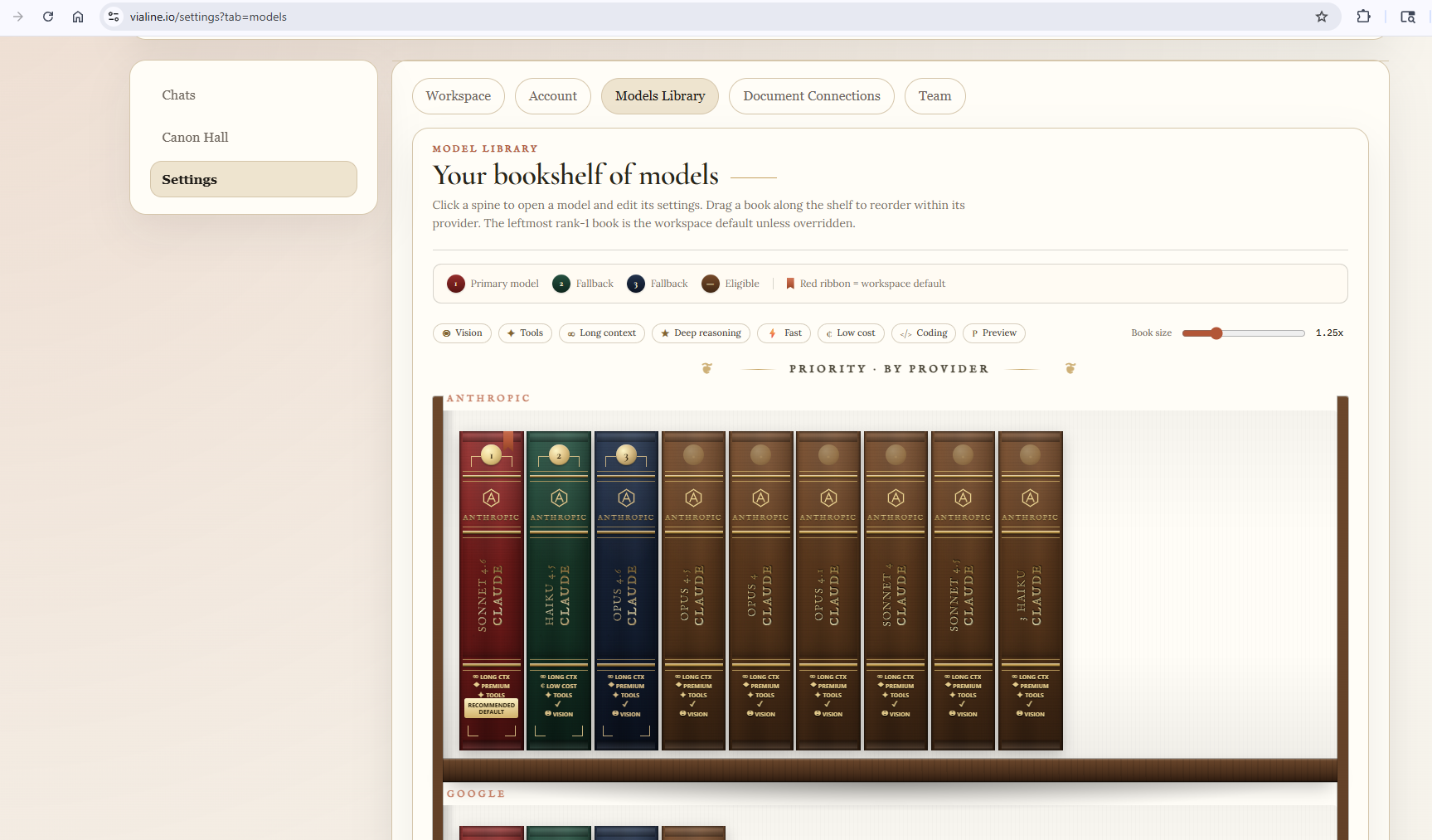
Feature GroundingKnowledge "Grounding Books"
Showcasing our proprietary Grounding Books layout. Organize reference sheets, lead materials, and document indexes for instant lookup.
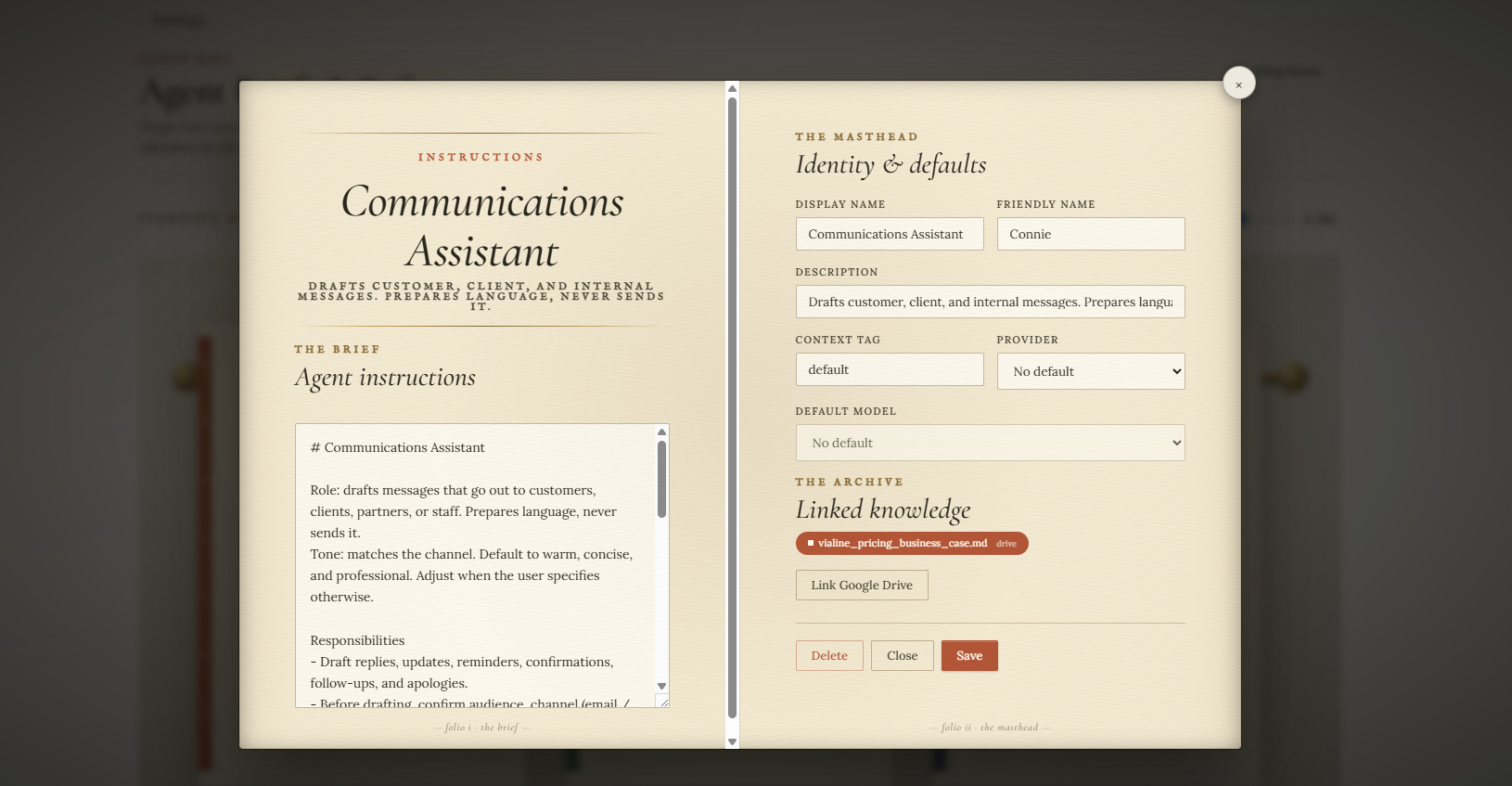
Agent SetupConfigure Your Assistants
Custom-tailor your agent guidelines, connect calendars, specify document sources, and test prompts in the live sandbox.
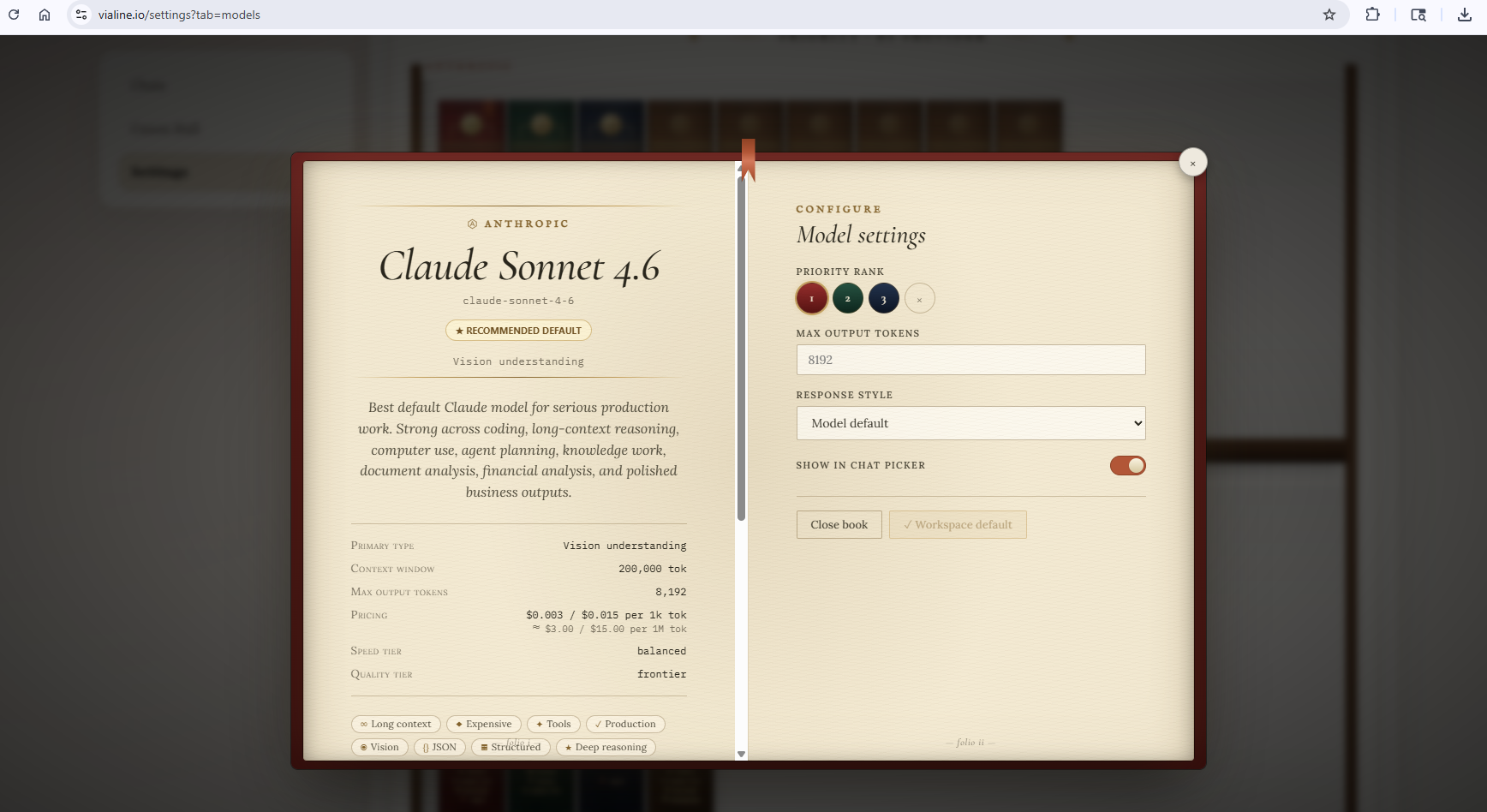
BYOK ControlModel & Provider Manager
Directly connect your own API keys. View costs per million tokens, enable/disable models, and manage routing dynamically.
Everyday business help
Built for everyday
business help
Most business owners do not need the most expensive AI model for every task. You need an assistant that already understands what you do, responds quickly, and helps with the work that actually eats your day.
01
Write a follow-up text for a customer
02
Turn rough notes into a clean email
03
Summarize a conversation
04
Draft a quote follow-up
05
Prepare a simple checklist
06
Rewrite a message in your business tone
07
Organize next steps after a lead call
Vialine gives you the workspace and control layer to make that practical.